

Running AI on premises with Postgres
View on GitHub | Download latest release | Documentation
Run your database, embeddings, indexes, and retrieval inside your network. Do this when you need data control, stable latency, and clear security boundaries. Keep the system small at first, then add parts as your load grows.
Decide if you should run on premises
Pick on premises when you must control where data lives. Pick it when you must keep traffic private. Pick it when you must hit a strict latency target. Pick it when costs grow with API calls and egress. If you need fast setup for a small pilot, start in cloud, then move the data plane later.
- Compliance: HIPAA, GDPR, PCI, residency rules, audit rules
- Security: private networks, strict access, limited outbound traffic
- Latency: stable p95 and p99, fewer hops
- Cost: high volume usage where per call fees add up
- Control: standard Postgres and a clear ops surface
Cloud vs on premises, quick view
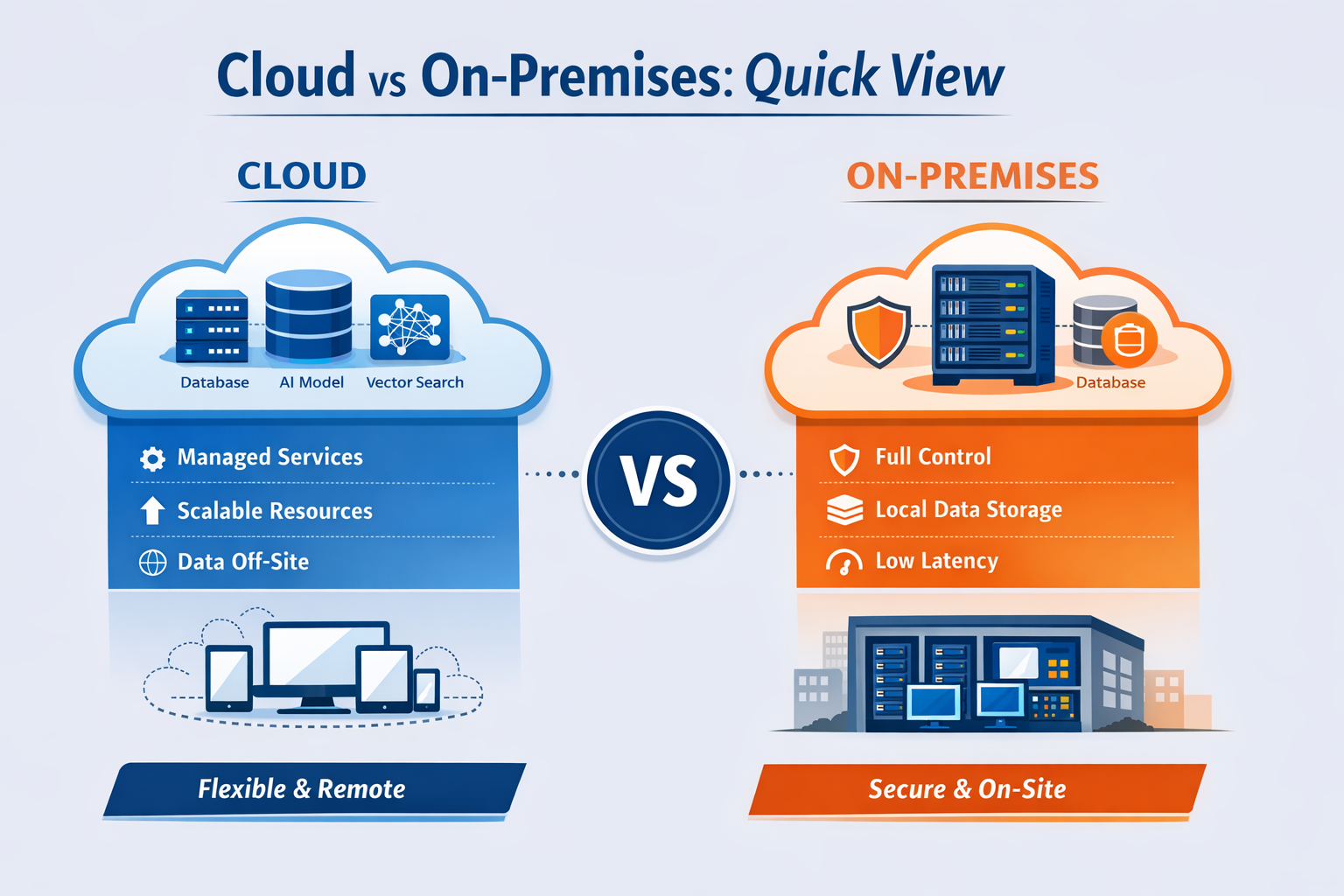
Watch your data movement. In many systems you fetch documents in one place, run embeddings in another, and run vector search in a third place. Each hop adds latency and failure modes. If you keep these steps inside one network, you cut variance and you debug faster.
Architecture overview
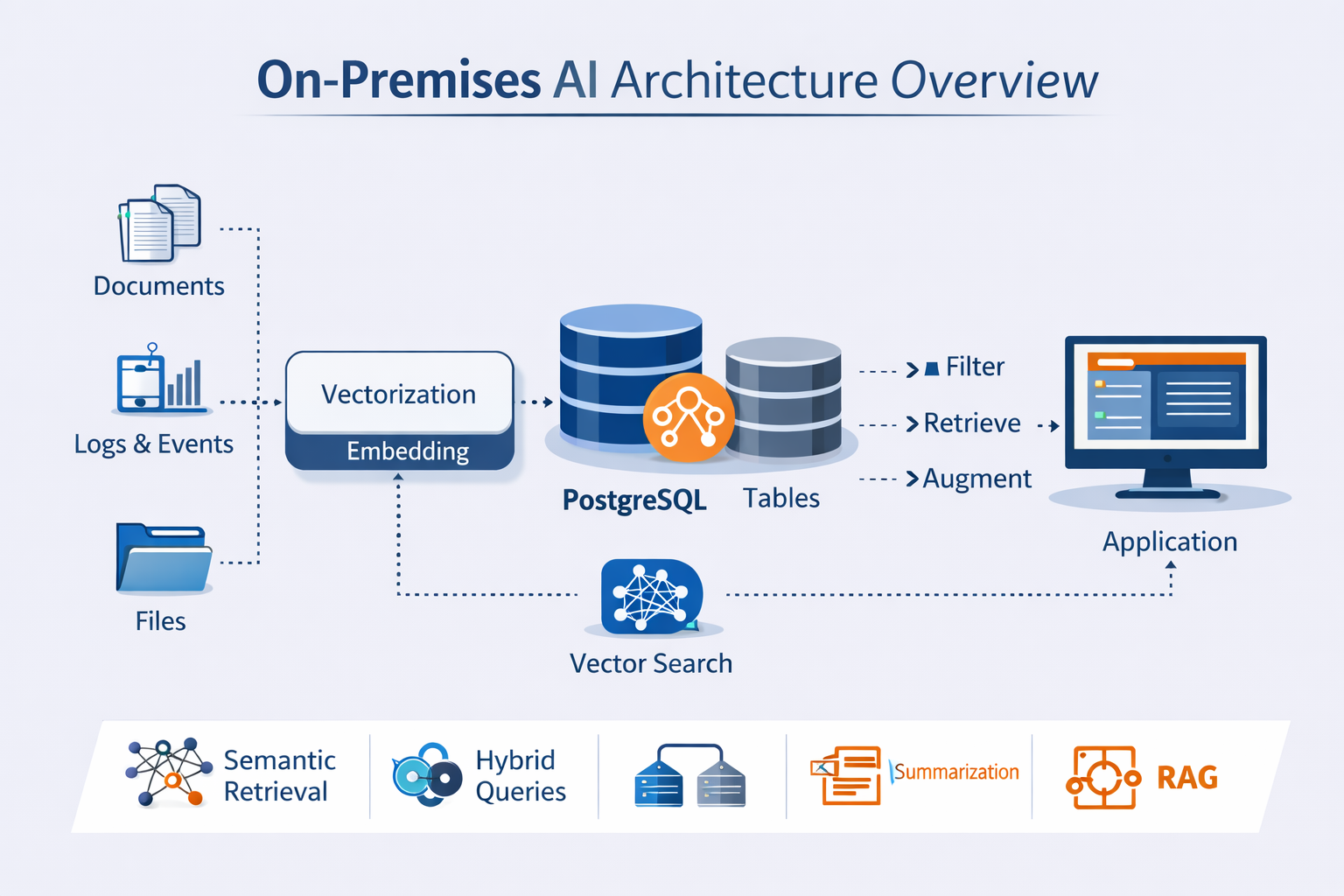
Keep the data plane local. Store documents and metadata in Postgres. Store embeddings next to the rows they describe. Build vector indexes in the same database. Run retrieval queries over private links. Expose results through your app services.
Keep three paths clear. Ingest is write heavy. Retrieval is read heavy. Admin work is rare but sensitive. Split these paths by network rules and by roles.

Put ingestion on a schedule. Batch it. Keep queries stable. Do not let ad hoc scripts write to the main database. Use a queue or a worker process. Record each run.
What you run
Keep the component list short. Assign an owner to each part. If you cannot name the host and the pager, you are not done.
- Postgres with NeuronDB for storage, embeddings, indexes, retrieval
- Ingestion workers for cleaning, chunking, and loads
- Embedding execution on CPU or GPU, batch jobs, steady throughput
- App services that call Postgres and return citations
- Monitoring for latency, load, pool use, lag, backups
Deployment patterns
Start simple. Prove retrieval quality. Prove latency. Add resilience only when you need it. Keep changes small so you can reverse them.
Single server

Use this for your first release. You get one host to secure. You get one Postgres instance to tune. You get clear failure handling. Add backups and dashboards before you add more servers.
CREATE EXTENSION neurondb;CREATE TABLE documents (id SERIAL PRIMARY KEY,content TEXT NOT NULL,embedding vector(384));INSERT INTO documents (content, embedding)VALUES ('Document content', embed_text('Document content', 'sentence-transformers/all-MiniLM-L6-v2'));SELECTcontentFROM documentsORDER BY embedding <=> embed_text('query', 'sentence-transformers/all-MiniLM-L6-v2')LIMIT 10;
Add filters early. It keeps results stable. It keeps cost stable. It keeps latency stable.
Data model and chunking
Store chunks, not whole files. Keep the original document id. Store offsets. Store a version. Keep chunk size stable. Start with 300 to 800 tokens per chunk. Start with 50 to 150 token overlap. Measure answer quality. Then change one variable.
CREATE TABLE doc_chunks (doc_id BIGINT NOT NULL,chunk_id BIGINT GENERATED ALWAYS AS IDENTITY PRIMARY KEY,tenant_id TEXT NOT NULL,source TEXT,content TEXT NOT NULL,created_at TIMESTAMPTZ NOT NULL DEFAULT now(),embedding vector(384));CREATE INDEX doc_chunks_tenant_doc_idxON doc_chunks (tenant_id, doc_id);
Track a content hash. It lets you skip re embedding on retries. It lets you detect duplicates. Use a text hash or a stable id from your upstream system.
Hybrid search with metadata and vectors
Filter with metadata, then rank by vector distance. Use this per tenant. Use it per source. Use it per time window.
ALTER TABLE documentsADD COLUMN tenant_id TEXT NOT NULL DEFAULT 'default',ADD COLUMN source TEXT,ADD COLUMN created_at TIMESTAMPTZ NOT NULL DEFAULT now();SELECT id, contentFROM documentsWHERE tenant_id = 'acme'AND (source IS NULL OR source <> 'spam')ORDER BY embedding <=> embed_text('query', 'sentence-transformers/all-MiniLM-L6-v2')LIMIT 10;
Ingestion workflow
Use one workflow. Keep it the same in development, test, and live. Run it in batches. Track each run. Start with these steps.
- Fetch raw documents
- Normalize text, strip boilerplate
- Split into chunks, keep offsets
- Insert rows without embeddings
- Compute embeddings in batches of 32 to 256
- Update embeddings
- Build or refresh indexes
- Run a sample query set, record p95
Set one target. Ingest 100k chunks in under 30 minutes. Then tune. If you cannot hit that target, reduce batch size, increase worker count, or move embedding execution to GPU.
Primary and replicas

Use this when you need uptime and read scale. Keep writes on the primary. Send retrieval reads to replicas. Use a pooler. Track replication lag. Set a rule for stale reads.
CREATE EXTENSION neurondb;CREATE TABLE documents (id SERIAL PRIMARY KEY,content TEXT NOT NULL,embedding vector(384));SELECT hnsw_create_index('documents', 'embedding', 'documents_embedding_hnsw', 16, 200);
Connection pooling
Use a pooler for app traffic. Set a hard limit on connections. Keep idle connections low. Track pool saturation. Start with 20 to 50 connections per app node. Raise it only after you measure.
Keep one rule. Do not let each app pod open hundreds of direct connections to Postgres. It will fail under load.
Indexing and maintenance
Indexes drift. Stats drift. Tables bloat. Plan for it. Batch ingestion. Refresh stats. Watch index size. Watch vacuum behavior.
ANALYZE documents;
Check query plans. Do it before and after each major ingest. You want an index scan for retrieval queries. You do not want a full table scan.
EXPLAIN (ANALYZE, BUFFERS)SELECT id, contentFROM documentsORDER BY embedding <=> embed_text('query', 'sentence-transformers/all-MiniLM-L6-v2')LIMIT 10;
Replication checks
Track lag. Track replay delay. Set an alert. Use a number. Start with 5 seconds for p95 lag. Use reads from the primary if lag exceeds your limit.
SELECTapplication_name,state,write_lag,flush_lag,replay_lagFROM pg_stat_replication;
Sizing
Start with three numbers. Vector count. Embedding dimension. Peak reads per second. Then add headroom. For raw float storage use vectors times dims times 4 bytes. Ten million vectors at 384 dims is about 15.4 GB for floats. Plan for more once you add row overhead and indexes.
Use a simple table. It keeps planning honest.
- 1 million vectors at 384 dims, about 1.5 GB floats
- 10 million vectors at 384 dims, about 15.4 GB floats
- 10 million vectors at 768 dims, about 30.7 GB floats
Security

Keep the database private. Restrict inbound. Restrict outbound. Limit roles. Log access. Keep backups protected.
- Put the database in private subnets
- Use a bastion or VPN for admin access
- Use TLS on internal links
- Use disk encryption at rest
- Use least privilege roles for apps
Roles
Create one app role per service. Grant only what it needs. Avoid superuser. Avoid owner roles in apps.
CREATE ROLE app_reader NOINHERIT;GRANT CONNECT ON DATABASE postgres TO app_reader;GRANT USAGE ON SCHEMA public TO app_reader;GRANT SELECT ON ALL TABLES IN SCHEMA public TO app_reader;ALTER DEFAULT PRIVILEGES IN SCHEMA public GRANT SELECT ON TABLES TO app_reader;
Performance
Start with measurements. Confirm index use. Batch embeddings. Filter early. Keep result sets small. Track pool saturation.
CREATE EXTENSION IF NOT EXISTS pg_stat_statements;SELECTcalls,ROUND(mean_exec_time::numeric, 2) AS mean_ms,ROUND(max_exec_time::numeric, 2) AS max_ms,LEFT(query, 120) AS query_previewFROM pg_stat_statementsORDER BY mean_exec_time DESCLIMIT 20;
Pick two numbers. Retrieval p95. Ingest throughput. Track them daily. Change one thing at a time.
Backups and recovery
Set RPO and RTO. Run restore drills. Write a steps document. Test failover in test. Keep the process repeatable.
Run a restore drill each month. Time it. Record it. Fix the slow steps. Keep one target. Restore in under 60 minutes for your core dataset.
Migration from cloud

Move the data plane first. Export docs and embeddings. Import into Postgres. Rebuild indexes. Mirror traffic. Compare answers and latency. Cut over with a rollback plan.
CREATE TABLE documents (id BIGINT PRIMARY KEY,content TEXT,embedding vector(384));SELECT hnsw_create_index('documents', 'embedding', 'documents_embedding_hnsw', 16, 200);
Cost model
Use break even months. Use capex divided by cloud monthly minus on premises monthly. Include staff time, power, support, and depreciation. Include egress and API fees on the cloud side.
Use one example with numbers. Keep it simple.
- Capex 120000
- Cloud monthly 18000
- On premises monthly 9000
- Break even months is 120000 divided by 9000, about 13.3
Checklist
- Pick a pattern, single server, cluster, hybrid, edge
- Set targets for p95 latency, QPS, RPO, RTO
- Lock down networks, subnets, firewall, bastion
- Add TLS and disk encryption
- Add a pooler
- Build indexes and check query plans
- Add monitoring and alerts
- Set backups and run a restore drill
Conclusion
Running AI on premises with Postgres gives you control, stability, and cost savings at scale. Start with a single server. Lock down security. Measure latency and throughput. Add resilience as you grow. Use NeuronDB to keep embeddings, indexes, and retrieval inside your network. Keep it simple. Keep it monitored. Keep it backed up.